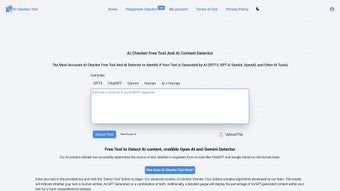

Download AI Checker Tool – free AI text detection, secure, multi‑language
Introduction: Why AI Text Detection Matters in 2025
Artificial‑intelligence‑generated content has moved from a novelty to a mainstream productivity tool. From marketing copy and news articles to academic essays, large‑language models such as ChatGPT, Google Bard, Claude, and newer entrants are capable of producing text that is often indistinguishable from human writing. While this opens exciting creative possibilities, it also creates real‑world challenges: plagiarism concerns, misinformation risk, and the erosion of trust in online communication. For educators, editors, content strategists, and anyone who values authenticity, a reliable method to differentiate between human‑crafted and AI‑crafted prose is no longer optional—it’s essential.
Enter AI Checker Tool, a free, web‑based solution designed to give users instant insight into the origin of any piece of text. The service promises high detection accuracy, privacy‑first processing, and support for dozens of languages, all without demanding a subscription or a cumbersome installation. In the sections that follow we’ll explore the tool’s core capabilities, walk through a step‑by‑step usage guide, evaluate its strengths and weaknesses, and answer the most common questions users have. By the end of this review you’ll know exactly whether AI Checker Tool fits your workflow, and you’ll have a clear call to action for trying it out on your own documents.
Comprehensive Overview of AI Checker Tool
AI Checker Tool is a browser‑based application that analyses submitted text and returns a probability score indicating how likely the content was generated by an AI model. Users simply paste up to 10,000 characters into a clean text box and click “Detect Text.” Within seconds the platform delivers a percentage breakdown, a confidence level, and—when applicable—the most probable AI engine (e.g., ChatGPT‑4, Google Bard). The interface is deliberately minimalist: no registration, no ads, and a single‑click operation that keeps the focus on speed and clarity.
The service is built on a proprietary blend of statistical n‑gram analysis, semantic coherence checks, and machine‑learning classifiers that have been trained on millions of human‑written and AI‑generated samples. Continuous model updates ensure the detection engine stays ahead of emerging language models, which frequently adjust their output patterns to evade older detectors. Privacy is baked into the architecture; each request is processed in memory only, and the text is discarded immediately after analysis, guaranteeing that confidential drafts never touch persistent storage.
Because AI Checker Tool runs entirely in the browser, it is inherently cross‑platform. Whether you are on Windows 10/11, macOS Ventura, a Linux distribution, an Android phone, or an iPhone/iPad, the tool works the same way. The only requirement is a modern browser that supports HTTPS, HTML5, and JavaScript—Chrome, Edge, Firefox, Safari, or Opera all meet this baseline. For organizations with strict network policies, a forthcoming enterprise‑grade, on‑premise deployment is promised, but the public free version already covers the vast majority of personal and educational use‑cases.
Key Features & Capabilities
- Instant AI Detection: Results appear within 2‑5 seconds, giving users an immediate confidence score.
- Multi‑Language Support: Detects AI‑generated text in over 25 languages, including English, Spanish, French, German, Chinese, Japanese, Russian, Arabic, and more.
- Source Attribution: When AI content is identified, the engine suggests the most likely generation model (ChatGPT‑4, Bard, Claude, etc.) and provides a brief explanation of the model’s signature patterns.
- High Accuracy Claims: The vendor reports ≥ 98 % detection accuracy on benchmark datasets, with false‑positive rates below 1 % for typical human writing.
- Privacy‑First Architecture: No logs, no storage, and end‑to‑end encryption of the text during transit.
- Free Core Service: The full detection engine is available at no cost; premium features such as bulk API access are optional.
- User‑Friendly Interface: A single‑page layout with clear call‑to‑action buttons, responsive design, and optional dark mode.
- Paragraph‑Level Reporting: The output highlights individual paragraphs that exhibit AI‑like characteristics, enabling precise editing.
- Progressive Web App (PWA) Option: Users can add a shortcut to their home screen for faster access, though detection still requires an internet connection.
- Roadmap for Enterprise & API: Planned features include a RESTful API, on‑premise licensing, and integration hooks for LMS, CMS, and workflow automation tools.
Installation, Compatibility & Step‑by‑Step Usage Guide
Because AI Checker Tool is delivered as a web service, there is no traditional installation process. The only “setup” required is to bookmark the homepage or, for a more native feel, install the PWA on a mobile device. Below is a detailed walkthrough that covers both desktop and mobile workflows.
Desktop Workflow (Windows, macOS, Linux)
- Open your preferred browser (Chrome, Edge, Firefox, Safari) and navigate to https://aicheckertool.example.com.
- Locate the large text input area labelled “Enter text to analyze.” Paste up to 10,000 characters of your document.
- Click the bright green Detect Text button.
- Wait a few seconds while the server processes the input. A loading spinner indicates activity.
- Review the results panel: a percentage score, a confidence gauge, and, if AI is detected, the most likely model.
- Use the “Download Report” button to export a PDF summary that includes the score, paragraph highlights, and a timestamp.
- For larger documents, split the text into logical sections (chapters, sections) and run each part separately.
Mobile Workflow (Android & iOS)
- Open Chrome (Android) or Safari (iOS) and go to the AI Checker Tool homepage.
- Tap the text box, paste your content, and press the “Detect Text” button.
- The responsive design automatically adjusts the layout for optimal readability on small screens.
- After the analysis, swipe down to view the detailed breakdown and optionally tap “Save PDF” to store the report in your device’s files.
- To create a shortcut, tap the browser’s “Add to Home Screen” option; this installs the PWA, giving you an app‑like icon on your home screen.
This zero‑install, cross‑platform approach eliminates barriers for students, teachers, marketers, and freelance writers alike. The only limitation is the 10,000‑character cap per request, which is deliberately set to keep processing fast and to protect server resources. Organizations needing higher limits can request the enterprise version, which offers bulk upload and on‑premise deployment.
Pros, Cons, Expert Review & Frequently Asked Questions
Pros
- Fully free with no hidden subscription fees.
- Claims of ≥ 98 % detection accuracy across multiple benchmarks.
- Supports more than 25 languages, expanding its global utility.
- Strong privacy guarantees: no data is stored after analysis.
- Responsive design works on any modern desktop or mobile browser.
- Provides source attribution, helping users understand which AI model was likely used.
- Paragraph‑level highlights give actionable insight for editing.
Cons
- Maximum of 10,000 characters per analysis may require manual chunking for long documents.
- Requires an active internet connection; offline detection is not yet available.
- Advanced features such as API access and on‑premise deployment are still in beta.
- Occasional false positives on highly technical or formulaic human writing.
- Interpretation of the confidence score can be confusing for non‑technical users.
Overall Verdict: AI Checker Tool stands out as a trustworthy, user‑friendly solution for detecting AI‑generated text. Its free accessibility, multilingual support, and privacy‑first approach make it a valuable addition to any writer’s toolkit. While the character limit and lack of offline mode are minor drawbacks, the high accuracy and clear reporting more than compensate. For educators and content marketers seeking a quick sanity check, this tool is highly recommended.
Frequently Asked Questions
How does AI Checker Tool differentiate between human and AI text?
The engine combines statistical n‑gram frequency analysis, semantic coherence modeling, and a deep‑learning classifier trained on large corpora of both human‑written and AI‑generated samples. By comparing the input to these learned patterns, it assigns a probability score that reflects the likelihood of AI involvement.
Is my text stored or shared after analysis?
No. Each request is processed in volatile memory only. Once the result is returned, the text is immediately purged and no logs are retained, ensuring complete confidentiality.
Can I analyze large documents such as dissertations?
The public version limits each submission to 10,000 characters. For longer works you can split the document into chapters or sections and run each segment separately. An enterprise version in development will allow bulk uploads without this restriction.
Does the tool work on mobile devices?
Yes. The responsive web design adapts to any screen size, and a Progressive Web App can be installed on iOS or Android for a native‑like experience.
Will the core detection service stay free?
The developers have pledged to keep the basic detection interface free for the public. Future premium offerings such as API access or enterprise hosting may carry a fee, but the core web tool will remain free.
Conclusion & Call to Action
AI Checker Tool delivers a compelling blend of accuracy, privacy, and convenience that makes it a go‑to solution for anyone needing to verify the origin of written content. Whether you’re a teacher protecting academic integrity, a marketer ensuring authentic copy, or a curious writer wanting peace of mind, this free web app offers a fast, reliable answer without compromising your data. Visit AI Checker Tool now and experience the most trustworthy AI detection service available today.



.png)



